
01 — Overview
Overview
a. Enterprise Land Management Concept
PT. Bara Alam Utama manages vast mining concessions requiring precise tracking of land acquisition boundaries, seller identities, land certificates (mst_sertifikat), and payment schedules (pembayaran_lahan). Previously, surveyors kept CAD maps offline while legal teams stored documents in separate folders. This fragmented process resulted in boundary conflicts and delayed acquisition pipelines.
We designed a centralized Web GIS application where all spatial layers, seller records, and transactional milestones are consolidated. Our team built the platform to serve as a single point of reference, allowing teams to verify boundaries, analyze land overlaps, and track legal acquisitions instantly.
b. Web GIS Architecture
We architected a unified GIS system connecting a Laravel 11 backend running on Laravel Octane with Roadrunner, a Filament v3 administrative control panel, and a PostgreSQL 17 database with the PostGIS 3.5 extension enabled.
The core spatial database stores geometries in the local projected UTM coordinate system SRID 32748 (UTM Zone 48S) to guarantee sub-meter accuracy for local area calculations. When a client requests map visualization, the server uses PostGIS functions to transform coordinates to SRID 4326 (WGS84) before returning JSON payloads to the frontend Leaflet.js maps. This guarantees high-fidelity, interactive map rendering across all web interfaces.
- Designed Star Schema spatial database extending PostgreSQL with PostGIS geometry layers
- Built real-time polygon overlap verification calculations utilizing ST_Intersects and ST_Area
- Implemented automatic UTM Zone 48S (SRID 32748) to WGS84 (SRID 4326) transformations
- Constructed custom Filament review workflows mapping Draft, Loaded, Updated, and Valid approval states
- Developed interactive Leaflet.js dashboard interfaces with Livewire form data bindings
- Engineered Excel cadastral spreadsheet parsers mapping coordinates to active geometry polygons
- Configured Roadrunner high-concurrency PHP application servers
02 — Problems & Challenges
Problems & Challenges
a. Spatial Data Rendering Performance
Rendering large, multi-vertex land polygons directly on Leaflet.js caused severe interface lag and client-side memory spikes, particularly when loading more than 1,000 spatial boundaries simultaneously.
We resolved this bottleneck by moving spatial operations from the runtime PHP application layer directly to the database. Inside MapService.php, we optimized queries to pre-convert and project geometry coordinates using raw SQL queries with ST_AsGeoJSON(ST_Transform(p.the_geom, 4326)) directly within SELECT statements. This offloads conversion overhead to PostgreSQL's engine, allowing Leaflet to ingest clean GeoJSON models instantly without application-side processing delays.
b. Complex Geospatial Queries
Calculating overlapping boundaries (irisan lahan) in real time during Excel imports or polygon redraws was a critical operational requirement. Overlap checks must identify coordinates conflicts and measure the exact intersection area without causing database timeouts.
We implemented spatial overlap calculations inside the getIntersectArea method. By leveraging ST_Intersects and measuring the overlapping zone with ST_Area(ST_Intersection(p.the_geom, ST_GeomFromText(?, 32748))), we calculate the exact area of conflict in square meters. To prevent false positives from minor survey discrepancies, we built a tolerance filter that discards any intersection area below the minimum threshold set in system configurations (minimal_toleransi_irisan).
c. Filament Map Integration
The default Filament admin resource does not natively support complex, interactive spatial editing tools, custom layer selection, or drawing overlays for land polygons.
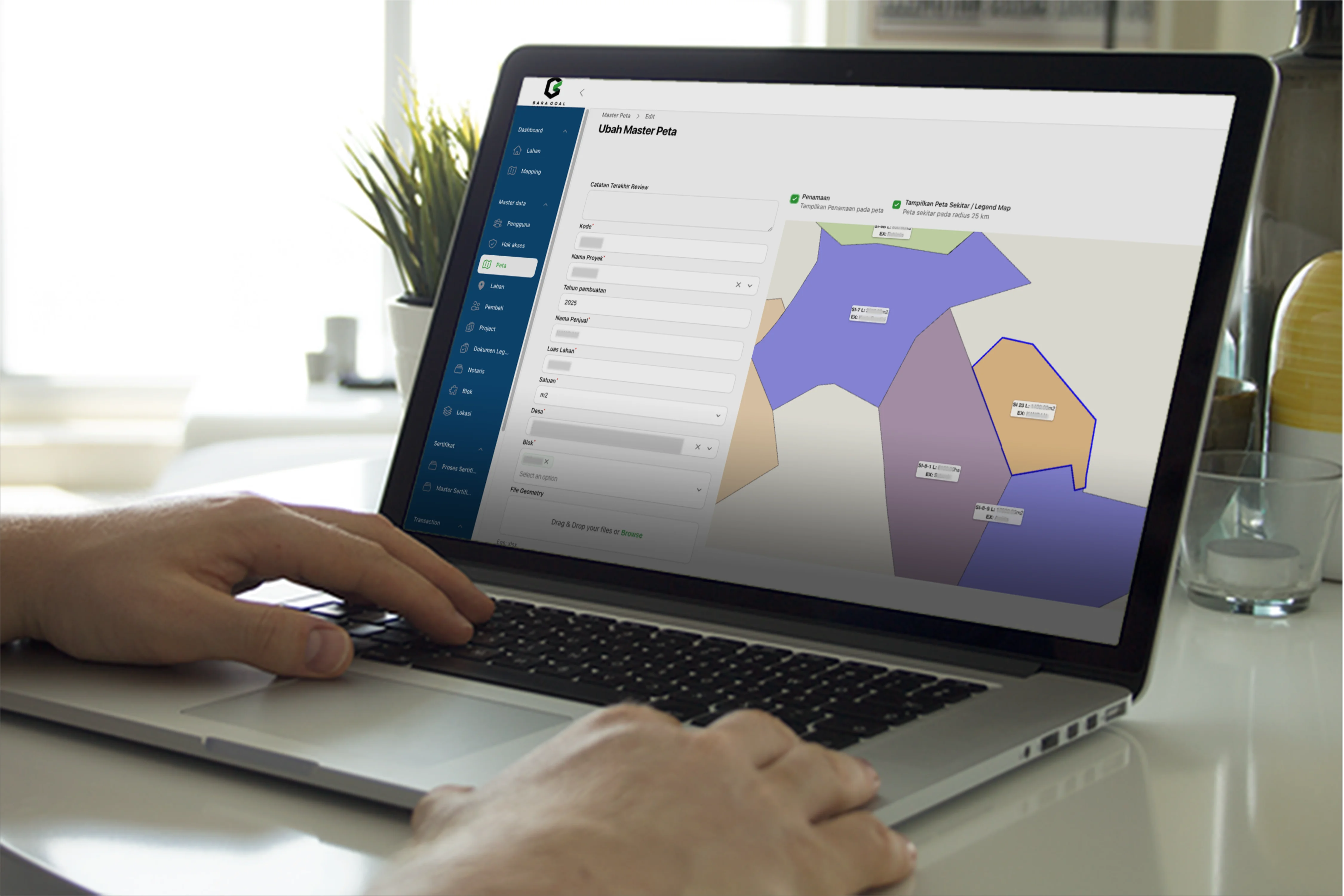
We solved this by developing custom Livewire wrapper components (form-mst-map-component.blade.php) and integrating them into Filament resource pages. We built a bidirectional bridge between Leaflet's drawing tools and Filament's state manager. When a surveyor draws or edits a polygon on the map, the coordinates are captured, converted into WKT (Well-Known Text) format, and synced with the form data fields automatically.
03 — Project Goals
Project Goals
a. Asset Digitization
The primary goal was to digitize all offline CAD spatial files and cadastral spreadsheets into a unified spatial database, preserving historical purchase logs and seller details.
We built Excel import parsers utilizing Maatwebsite Excel, parsing UTM coordinates directly from spreadsheets and saving them as valid spatial polygon objects (the_geom) in the PostgreSQL database.
b. Centralized Spatial Database
We set out to establish a single source of truth for GIS specialists, operations managers, and legal notaries, eliminating fragmented communication and data loss.
By designing a shared database, updates made by surveyors are immediately visible to legal teams, ensuring transaction records align with active spatial boundaries.
04 — Design Process
Design Process
a. PostGIS Database Schema
We designed a normalized spatial database structure. The core spatial table mst_peta holds the polygon coordinates in a spatial geometry column (the_geom, SRID 32748), which is linked to parent records like mst_proyek and mst_desa.
To maintain a clear log of spatial boundary updates, we implemented an audit history mechanism. Every update or deletion to a map boundary automatically clones the old record into the mst_peta_history table, preserving historical polygons and legal descriptions.
b. Interactive Map UI/UX Design
We designed a clean, dark GIS dashboard utilizing Leaflet.js overlays. The UI maps distinct colors to parcel boundaries based on their legal status (e.g., green for Approved, orange for Process, and gray for historical records), helping operators assess land availability at a glance.
We positioned search tools, scale rulers, and layer selectors in a non-intrusive layout. Map pages display details such as project names, block names, village names, and areas (luas_lahan) inside interactive side panels, avoiding cluttered pop-ups.
c. Polygon Editing/Detail View
For surveyors, we created a focused spatial editor interface. This view integrates drawing tools directly into Filament's edit page, allowing surveyors to adjust polygon nodes and update database shapes with immediate boundary overlap feedback.
05 — Usability Testing
Usability Testing
a. Query Load Time Optimization
To guarantee rapid map rendering, we set up GiST (Generalized Search Tree) spatial indexes on all geometry columns (the_geom). We executed stress testing, measuring query speeds under concurrent radius searches.
By leveraging GiST indexes, spatial queries (such as ST_Distance calculations for nearby parcels) respond in sub-millisecond times, ensuring that dashboard filter actions remain fast and responsive.
b. Polygon Rendering Tests
We conducted stress testing by rendering over 1,000 spatial boundaries on Leaflet. We verified coordinate conversions from imported Excel spreadsheets, ensuring that complex shapes are parsed and drawn accurately without rendering gaps.
06 — Prototyping & Handoff
Prototyping & Handoff
a. Internal Server Deployment
To support PT. Bara Alam Utama's secure internal operations, we deployed the application on their private server network. We configured Laravel Octane running on RoadRunner behind an Nginx proxy to optimize application concurrency and responsiveness.
We set up automated deployment scripts using Deployer, establishing a version-controlled pipeline that runs migrations, installs composer dependencies, and compiles front-end assets automatically.
b. Role-Based Access Control [RBAC]
We implemented a strict role-based access control (RBAC) model. Access to map edit controls is limited to the Surveyor role, while the review and approval interface is restricted to users with review-map permissions.
The system routes maps through a controlled workflow (Draft, Loaded, Updated, and Valid approval states). Surveyors upload maps as Draft or Loaded, triggers automatically email reviewers, and only authenticated managers can approve and transition maps to the Valid state, ensuring strict data governance.
07 — Key Takeaways
Key Takeaways
a. Mastering Laravel Spatial Capabilities
This project demonstrated that Laravel combined with PostgreSQL/PostGIS can serve as a robust platform for enterprise GIS applications. Direct database integration simplifies workflows, removing the need for expensive, standalone desktop GIS software.
b. Delivering Enterprise-Grade GIS
By linking spatial boundary polygons directly to legal certificates, seller profiles, and payment milestones, we built a tool that bridges the gap between geographic data and core business operations.